Comparing research citations with web links

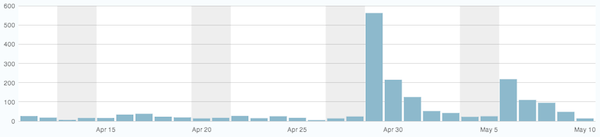
graph of recent page views on this site
Recent page views on this site
Everybody likes it when their work is recognized, especially when the recognition is coming from leaders in the field. Over the course of the past week, your humble correspondent has had work noted in two very different realms. One of my posts here on Gravitropic was linked by several people, most visibly by Dave Winer, the developer of the software I was discussing, resulting in a big (for this site) spike in traffic. At the same time, an article was published in Current Biology that cited our recent paper on lateral root patterning. Both events represent the same principle and illustrate the power of the citation. At the same time, there seem to be significant differences between online links and scholarly citations that may be worth considering. I wonder whether scholarly writing could take some lessons from online linking.

When I link to an article or blog post on the web, or when I cite an article as a building block in an argument, I am assigning credibility to that source. I am usually saying I agree with the point being made, and in the case of a scientific article, I am likely proposing to build on top of that finding. Sure, sometimes we link to outlandish articles online just to point and mock, or we cite findings that are refuted by the results at hand, but those are the exception. By and large, to cite or link is to endorse.

It follows from this that I judge the work I am citing to be of high quality or in some way noteworthy, and the act of citing it helps it grow in status. In the case of online articles, more links from quality sources leads to greater status and higher ranking in search results. But for scientific articles, the surfacing of high impact papers is not an automatic process. It seems to rely more on a researcher noticing a particular work cited by multiple sources rather than an algorithm returning a work closer to the top of the search results. I would posit that the process of identifying important work and incorporating it is part of the art of practicing science. Of course you can set a database like Web of Science to sort by number of times cited, but that tends not to be all that useful. I wonder if the identification of important papers in a field is done algorithmically by any scholarly databases in a way similar to PageRank?

Links and citations also differ when it comes to which side of the link has the most value. In the case of research and scholarship, articles that become highly cited earn their authors an increasing level of influence within a field. While this is true up to a point with online links, much of the value in this field seems to lie with those entities — individuals or companies — that do the linking. One example of this is Google itself, which created value by “organizing the world’s information“. They drive so much of the traffic on the web by acting as an index and arbiter of quality for a given keyword or topic. In a similar way, sites like Daring Fireball that link to important articles in a particular field have become extremely valuable, in part for their original writing, but also due to the web traffic they drive.

I wonder why there are not such drivers of traffic in specific, narrow fields of research, experts that both express an opinion and drive viewers to particular articles worth reading. In a certain sense this is what review articles do, but on a timescale of years. Is this ‘middleman’ missing because of the time and caution required to puzzle together a research mystery? Is it missing because nobody has the time? Maybe the missing element in scholarly work is the ‘pageview’ metric? Will the incorporation of page views for more progressive online publishers like the PLoS journals change any of this?

Defining success in summer research

Yesterday marked the first day of the summer research season. One of the things I really like about my job is the cycles of the academic year: the excitement and anticipation of the new school year every fall, the sense of exhaustion just before the break, autumn on campus (you can almost picture the tweed, I know), intermission between semesters, etc. Summer research with students is one of my favorite times.

I was at the dentist yesterday morning, and he was asking what projects I was working on in the lab for the summer. I told him a few of the new directions we were heading and he commented that he hoped everything went well and that we had a successful summer. That exchange started me thinking about what defines a successful summer for me, and it may not be exactly what you would think.

Of course the highest form of success for summer research is to generate publishable data, and I make this the clear goal for the students. In an ideal world, they would work on an important question, carry out carefully controlled experiments in a systematic way, and find a clear difference between their control and experimental treatments. Although the first 3 of these factors are under their control, there is no way to know the outcome of an experiment and its significance in advance, so I try not to think of success in terms of the outcomes of experiments and whether or not they represent publishable results. If I were at a research university, I’m sure I would have a different perspective, but I’m not, and the nature of working with undergraduates doesn’t permit this definition of success.

If the publishability of the results doesn’t determine the success of a summer research experience, what does? For me, I think summer research has been successful when a student has done real research. That means they grasped a question (see below for more on this), conceived of an experiment to test a hypothesis, performed the experiment, analyzed the data, and evaluated the results in light of their original hypothesis. Sometimes (hopefully) their work forms a unit on or around which other units can be built into a paper.

‘Grasping a question’ is not to say they get free reign to choose any topic they want. In my lab, students have to focus on an area that supports the direction of the lab as a whole. I think it’s important that they own the project to some degree, but the only way to ensure the importance of their project is to limit it to something in my area of expertise.

Better meetings through podcasts

Back to Work podcast cover artListening to podcasts has become one of my guilty pleasures, with Back to Work topping the list on both counts. I’m not quite sure why I say guilty, maybe because some that I listen to come dangerously close to being part therapy session and part college seminar (not counting the parts about comics and superheroes). I’m not even sure which part of that combination makes me feel guilty, it just does. But regardless, Back to Work has an uncanny way of wandering around in a fog of silly and bumping into incredible insights about work and life. Even in the shows where Merlin is clearly reading from his cards, the fog and the insights are still there.

In the episode Invitation to a Blame Party, there is a great section, beginning at around 1:03:00 on how to run a meeting. Actually, it’s more like how to create a culture in which meetings are productive. No, scratch that, it’s more about how to help create a productive culture, period. Meetings are not the goal, doing the thing you do is the goal. Bad meetings can completely sabotage productivity and waste time, and the time loss is multiplied by all the people in the room.

Even though I’m not a corporate stooge, meeting culture in academia is no better, and it might be worse. It’s one thing to sit through a meeting you shouldn’t have to attend, but it’s a whole different experience to be in a meeting where everyone has a Ph.D. in an area far, far removed from the topic at hand. Earning a Ph.D. means you are smart, tenacious, creative, and probably somewhat self-loathing (I kid, you don’t really have to be that smart). Being a professor means there are some people who are required to listen to your ideas, usually for an hour, three times a week. They even pay for the opportunity to hear your ideas. The combination of having a Ph.D. and having access to people who pay to hear your ideas can do some strange things to a person, and meetings are the most likely place for the strangeness to come out. Kind of like combining distant relatives with an open bar at a wedding — nothing good can come of it, with the possible exception of some YouTube ad revenue. So the more control and focus that can be maintained in a meeting, the better for everyone.

All of the suggestions in this episode for improving meetings are great, but the best advice, in my opinion, is the idea of scheduling guests. Don’t ask every person to attend the whole meeting, call in experts when needed and only in response to a specific question. I like this so much because if you’re going to schedule guests, then you have to know in advance what your aims and agenda are. If you have people scheduled, you have to watch the clock and move through your agenda items. It serves as a keystone for the rest of the points about running good meetings. And speaking of which, I have a meeting with a tall stack of final exams, where I find out whether the people who spent all the money to listen to me actually heard anything!

Lessons learned – Plant Physiology 2013

student poster on zinc and plant growthI’m still waiting on the final research papers from my Plant Physiology students, but everything else for this class is wrapped up. Today I tried something new for their poster presentations, replacing the research posters on the boards in the hallway around my lab with their project posters. This worked better than I expected, enabling the students to mill around and discuss their work with each other; it was not too unlike what happens at an actual poster session.

I like to debrief this class in person every time I teach it because I feel like their shared reflections sometimes lead to input that wouldn’t have emerged without a real-life conversation. One of the topics that came up today was the need for more feedback in the planning stages of their projects. Although they all seemed to like the open-ended nature of the mutant project, several of them said they would have benefited from a more formal meeting with me after they submitted their proposal, but before beginning their experiments. I like this idea and plan to try it next year.

Another good suggestion was to structure the early part of the semester to include some more traditional lab experiences that would expose them to some of the routine methods they were likely to require for their projects. Those first few weeks always feel a bit wasted even though I warn encourage them to use the time wisely by reading widely on their topic, so I think I’ll try mixing it up next year.

On the technical side, only one group in five succeeded in using PCR to confirm their T-DNA insertion. I know each group used the online primer design tool correctly since I checked their work before I placed the order. I’m guessing the weak link in the chain was with either the DNA isolation protocol or bad pipetting technique. I can address both of these with a little more oversight next time, I hope.

film Moana 2016 online streaming

A week with the Fargo outliner

I’ve been using Fargo, the new outlining tool that lives in the browser, pretty heavily for the past week. As this semester winds down, I’m busy preparing to teach my summer session class and train about five research students in the lab for the summer. Both of those activities require a lot of thinking and planning, and because Fargo solves my biggest problems with other outlining tools, I’ve been using it fearlessly.

One of my observations over the past week is that I appreciate having an ambient writing space. By not having to think about where to write something, I’ve tended to write more. This may seem dorky, but I think there’s something to it. Also, having a scratchpad outline where I can both collect research fragments and string them together into paragraphs feels powerful.

It doesn’t hurt that Small Picture has added two power features over the past week, either. Both the ability to post directly to a WordPress blog and support for Markdown on export make Fargo an even more appealing writing environment. What I like about both of these features is the implicit acknowledgment that Fargo is not necessarily a final destination for ideas, that it is happy to help give birth to them and send them on their way.

Despite its strengths, Fargo is still young and has some rough edges. One minor annoyance is the way the dialog boxes that open when entering a link or exporting to Markdown don’t respond to the ‘Return’ key consistently. Maybe this is a limitation of programming an application in the browser, but it seems if I can dismiss one dialog with the Return key, I ought to be able to dismiss others. For example, I always seem to be able to ‘OK’ the Link dialog by pressing Return, but not the Attribute Editor dialog.

One issue I encountered while writing this very post is with cutting and pasting. I wanted to split a paragraph, so I created a new node, cut the text I wanted, and pasted it into the new node. No problem, except all of the links that were in the text went away. Toggling into non-render mode avoided this, but I doubt I’ll remember to do that before editing text.

Another complaint I have is that I can’t edit the attributes of more than one node at a time. I’d like to be able to select a few nodes and add an icon to them, as described by Jeffrey Kishner at imissmymac.com. This converts the stock wedge into something more visually descriptive. All of the icons in the Font Awesome collection are available, but right now they have to be assigned one-at-a-time.

What does smarter calendar software look like?

There’s a smart piece at Macworld with some suggestions for making calendar software smarter, including this gem:

I’d love a feature that allowed me to set a maximum meeting load, after which my entire day would become blocked off as busy and all future meeting requests would be declined.

During advising season, when I’m meeting with my 23 advisees in a 3-week period, I already do what he describes, adding dummy appointments for breaks and class prep time. But with a little smarts built in to the calendar software this would be unnecessary.

One point in the article that I have to disagree with is this:

[…] calendars that show you an entire week or month are wasting space—and the closer you get to the end of the week or month, the more space it wastes. Can’t we break free of this metaphor and let time and space be a little more flexible?

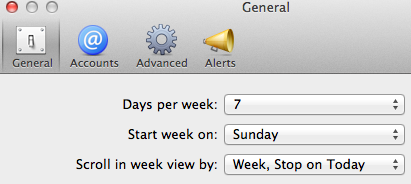
Preference dialog for Calendar on MacI’ve tried to use the Calendar app in Mountain Lion configured to ‘Scroll in week view by week, stop on today’ and just can’t get used to it. I agree this seems like a better use of space, but I have become so habituated to glancing at my calendar and associating position with day of week, I can’t break out of it. I always see the left-most column as Sunday, and the right-most as Saturday. In addition, I think there’s value in viewing time in actual weeks and months and years, I think that adds rather than detracts.

Fargo solves outline syncing and sharing

I love outlines. One of my favorite writing and thinking tools is OmniOutliner. Most of my teaching notes start life in an outline, and some complete classes live within a single outline. Every research paper I’ve written in the past 8 years has started as an outline. I can’t imagine a better tool for organizing and re-organizing ideas as I think through the best way to explain something. There are two problems with outlining software, though: sync and sharing. Both of these problems are solved by Fargo, an outlining application that lives completely in the browser.

In my dream world, the outlines I keep on my Mac would automatically sync with the outliner on my iPad. Even though they’re working on it, the Omni developers don’t yet have this working between their Mac and iPad clients. I can use Dropbox to act as a middleman, but that’s not the same as real sync; I have to remember to manually update to the latest version of the file when I’m using the iPad, and to export changes before I open the file again on the Mac. Ugh, might as well use a floppy while you’re at it.Watch Full Movie Online Streaming Online and Download

fargoAppAs a native web application that runs in the browser, Fargo is never not in sync. Here is how it works: when you first load http://fargo.io in your browser, you are prompted to grant access to your Dropbox, where it stores your outlines in a folder. From that point, any outlines you open or create in Fargo are always in sync. I was able to export my topic outline from OmniOutliner as an OPML file, move it into the Fargo folder in my Dropbox, and open it from within the Fargo app running in my browser on my Mac and iPad. I like to teach with my notes on my iPad, and this has been a perfect solution. Editing on the iPad has already improved significantly from the first days after launch to detect the touch interface and allow single taps instead of double-clicks, for instance.

The other major bummer with outlines is that I’ve never found a good way to share them. I can’t send an OmniOutliner file and expect anyone else to know what to do with it, and even the open OPML format is not widely known. I complain when somebody sends me a Word file, so I surely can’t be so hypocritical as to distribute an even more obscure file type. This means that at some point in the life of an outline, I have to give up and export to plain text or HTML, which means, from that point on, I lose most of the advantages of a real outliner.

Fargo has an answer to this problem too, with a built-in ‘Reader’ mode. In Reader, the outline is read-only and outlines can be shared through the Reader with anyone through a public link. For example, have a look at my outline on plant reproduction. I haven’t tried this with students yet, but I think it might be a solution to the sharing problem for teaching outlines while I am still editing and building the outline.

Fargo is being developed by a startup of two called Small Picture, one of whom is Dave Winer, who is, in my opinion, the prototypical blogger, but I’ll write more about him and how he has inspired me some other time. Suffice to say, I think the small team at Small Picture is onto some big ideas.

Are MOOCs textbooks masquerading as courses?

About an hour before class on Friday, it began to dawn on me that half of my plant physiology class could be out for the day. Many were attending a botany conference in Columbus, others had emailed that they were sick. When I arrived at class, my suspicions were confirmed — 8 of 15 students were there. I decided to record my comments for the day later and held an impromptu study session for the upcoming exam. I had no idea what it would take to “just record my lecture” for the day.Watch Shark Exorcist (2016) Full Movie Online Streaming Online and Download

inspector panel in Keynote

When you’re used to standing in front of a class and explaining things, it’s very hard to explain things to a computer screen in an empty office. Very, very hard. Not in the technical sense, as Keynote (and I imagine Powerpoint) has that covered. I just opened up my Keynote slideshow for the day, opened the slide inspector, started a slideshow recording, and boom. I made it through the first slide. I glanced at the next slide and drew a blank. I paused the recording, collected my thoughts, and resumed recording. Blanked, paused, resumed, etc

Two hours. That’s what it took me to record 35 min of lecture over 36 slides. The last few slides were a slog, I was drained — way more than after a regular classroom session. After I finished it and sent the link to the class, I started wondering what it must be like to do this for every class. I recently saw an article reflecting on the development of a new MOOC on Coursera, in which the author describes her efforts and those of the production team. I guess I should be happy with only needing 2 hours to record 35 min of material, since it took an hour for her to record a video that will run 3 minutes! 

On one hand, I wish I had the time and talent to build a complete online course from the ground up and have students around the world learning from me, no doubt there is something alluring about that. But I can see how the kind of resources required to do that and do it well keeps it beyond the reach of all but a few faculty. In fact, it seems not unlike the resources needed to create a textbook. Both projects would need several subject area experts, dozens of artists and editors, several experts in learning technology and assessment, a production staff, and I’m sure many others I haven’t imagined. I think this is no coincidence, as I can see MOOCs coming to replace, or at least heavily supplement, traditional textbooks in some courses or parts thereof. Although some publishers see MOOCs as a big sales opportunity due to their large enrollments, it is notable that Coursera itself is urging instructors “not to require any textbooks that cost money” (quoted from previous link). This makes me wonder whether the MOOC platforms (Coursera, edX) are in more direct competition with textbook publishers than anyone really realizes. In fact, that may be a useful lens to evaluate their impact on education, by way of comparison to textbooks, which are all now scrambling to “become digital,” just like MOOCs.

Finding the algorithm: An introduction to reading and understanding scientific papers

I love this concise primer on how to take apart a scientific paper, and it translates almost perfectly to the literature I commonly assign in my upper-level undergraduate classes as well.

JBC [Journal of Biological Chemistry] papers, as is with articles in most biomedical journals, have a basic structure/algorithm.  Once you’ve mastered the algorithm, presenting the paper is much easier.

via THE SUBSTRATE.